
Mercedes-Benz GLK-Class: Memory function
Storing settings
With the memory function, you can store up to three different settings, e.g. for three different people.
The following settings are stored as a single memory preset:
- position of the seat, backrest and head restraint
- driver's side: steering wheel position
- driver's side: position of the exterior mirrors on the driver's and front-passenger sides
 WARNING
Do not activate the memory function while driving. Activating the memory function while driving could cause the driver to lose control of the vehicle.
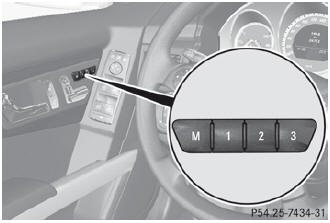
- Adjust the seat ().
- On the driver's side, adjust the steering wheel () and the exterior mirrors ().
- Press memory button M and one of the storage position buttons 1, 2 or
3 within three seconds.
The settings are stored in the selected preset position. A tone sounds when the settings have been completed.
Calling up a stored setting
 If you want to move the seat from the fully reclined position to a stored seat
position, first raise the backrest. The seat could otherwise be damaged.
If you want to move the seat from the fully reclined position to a stored seat
position, first raise the backrest. The seat could otherwise be damaged.
Press and hold the relevant storage position button 1, 2 or 3 until the seat, steering wheel and exterior mirrors are in the stored position.
 The setting procedure is interrupted as soon as you release the storage position
button.
The setting procedure is interrupted as soon as you release the storage position
button.
 Mirrors
See also:
Ignition switch
- Never turn the ignition switch to
“LOCK” while the vehicle is
being driven or towed because
that will lock the steering wheel,
preventing steering control. And
when the engine is turned off, it
takes a much greater effort than
...
Ignition switch
Illuminated ignition switch (if equipped) Whenever a door is opened, the ignition
switch will be illuminated for your convenience, provided the ignition switch is
not in the ON position. The light will go off approximately 10 seconds after clos ...


